
Q: When I am browsing Real-time ROLAP cube, I am getting error message: OLE DB Error: OLE DB or ODBC error: You do not have permission to run 'SP_TRACE_CREATE'.; 42000.
Q: When I am browsing Real-time ROLAP cube, I am getting error message: OLE DB Error: OLE DB or ODBC error: You do not have permission to run 'SP_TRACE_CREATE'.; 42000.
A: When you setup measure group property ProactiveChaching to "Real-time ROLAP" then SSAS assigns by default partition notification type to 'SQL Server'. This notification type uses SQL Server trace to track changes to your tables. For these traces to work properly, either the data source or Analysis Services service account should be configured to use an account with System Administrator privileges on the SQL Server.
So to fix this problem you should identify service account that Analysis Services is using and then assign it to the sysadmin server role.
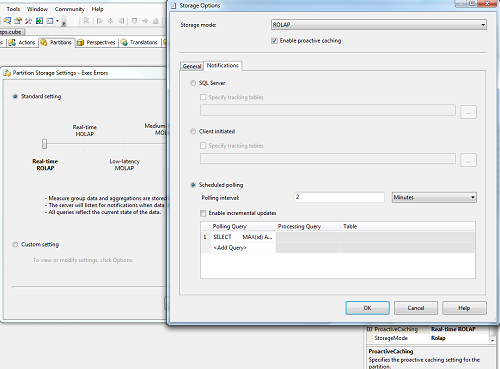
You can also consider changing Notification type used by Proactive caching.You can do this by following these steps:
- Open the cube in the BIDS
- Select your measure group and make sure that property "StorageMode" is set to "ROLAP" is set to "Real-time ROLAP".
- Select your measure group and make sure that property "PractiveCaching"
- Go to "Partitions" tab and select your partition. Make sure that Aggregations column says "Rolap 0%" (instead of 0 there could be any other number). If you see that your partitions is not ROLAP, you can drop it and create new partition.
- Click on "Storage Settings..."
- Click on "Options..."
- Select "Notifications" tab. If you see error message "You must set notification and processing options for each partition separately. To set these options, click Cancel and select a single partition.", that means you have not selected partition before clicking on "Storage settings...".
- Change "Notifications" type from "SQL Server" (default) to "Client Initiated" or "Scheduled pooling".
Related resources:
Tags: design, faq, management, rolap