


 RSS Feed
SSAS 2008 DMVs – querying from the SQL Server and database diagrams
July 22nd, 2008 by Vidas MatelisIn Analysis Services 2008 Microsoft introduced many schema rowsets that are very similar to SQL Server Data Management Views (DMVs). Although in Books Online Microsoft refers to these new tables as “schema rowsets”, it is just easier for now to call them DMVs. You can use these DMVs to query SSAS 2008 metadata and actual data. Here is the link to my original post about DMVs.
You can execute queries on DMVs directly in Analysis Services. For example you can connect to Analysis Services from SQL Server Management Studio, choose menu item “File”->”New”->”Analysis Services MDX Query” and write your query to select data from DMV.
You can also execute queries against SSAS DMVs from SQL Server environment. At this point I believe this is going to be preferred method to query SSAS DMVs. This is because queries on DMVs in Analysis Services has many limitations, yet these limitations do not exists for queries from SQL Server linked server. Example of such very important limitation – in Analysis services you cannot join 2 DMVs.
To query DMVs from SQL Server you will need to create linked server that points to Analysis Services database. Here is example of the code that creates linked server named SSAS2008Test:
EXEC master.dbo.sp_addlinkedserver
@server = N’SSAS2008Test’
, @srvproduct=N’MSOLAP’
, @provider=N’MSOLAP’
, @datasrc=N’VirtualPC1′ — Server Name
, @catalog=N’Adventure Works DW’ — Database Name
go
EXEC master.dbo.sp_addlinkedsrvlogin
@rmtsrvname=N’SSAS2008Test’
, @useself=N’False’
, @locallogin=NULL
, @rmtuser=NULL
, @rmtpassword=NULL
GO
After linked server is created, you can query DMVs using OpenQuery function. For example, this is the query executed from SQL Server to get Analysis Services connection information:
SELECT *
FROM OPENQUERY(SSAS2008Test, ‘SELECT * FROM $SYSTEM.DISCOVER_CONNECTIONS’)
After setting up SSAS linked server I decided to create database diagram from SSAS DMVs. This looked like an easy task. For each DMV I create a statement that selects data from DMV and selects data into SQL Server table. I actually created statement that creates these statements:
SELECT ‘SELECT * INTO ‘ + SUBSTRING(TABLE_NAME,1,100)
+ ‘ FROM OPENQUERY(SSAS2008Test, ”SELECT * FROM $SYSTEM.’ + SUBSTRING(TABLE_NAME,1,100) + ”’)’
FROM OPENQUERY(SSAS2008Test, ‘SELECT * FROM $system.dbschema_tables’) as s
WHERE SUBSTRING(TABLE_SCHEMA,1,100) = N’$SYSTEM’
Result of the query above is:
SELECT * INTO DBSCHEMA_CATALOGS
FROM OPENQUERY(SSAS2008Test, ‘SELECT * FROM $SYSTEM.DBSCHEMA_CATALOGS’)
SELECT * INTO DBSCHEMA_TABLES
FROM OPENQUERY(SSAS2008Test, ‘SELECT * FROM $SYSTEM.DBSCHEMA_TABLES’)
SELECT * INTO DBSCHEMA_COLUMNS
FROM OPENQUERY(SSAS2008Test, ‘SELECT * FROM $SYSTEM.DBSCHEMA_COLUMNS’)
SELECT * INTO DBSCHEMA_PROVIDER_TYPES
FROM OPENQUERY(SSAS2008Test, ‘SELECT * FROM $SYSTEM.DBSCHEMA_PROVIDER_TYPES’)
SELECT * INTO MDSCHEMA_CUBES
FROM OPENQUERY(SSAS2008Test, ‘SELECT * FROM $SYSTEM.MDSCHEMA_CUBES’)
….
Then I executed each query. It was a bit more complicated then I thought it is going to be:
- I had to change some queries to use restrictions using SYSTEMRESTRICTSCHEMA functions.
- Some other queries were giving me error messages, that I reported to Microsoft. For example I could not run query on DMV: $SYSTEM.MDSCHEMA_MEMBERS. Error message was: “Server: The operation has been cancelled due to memory pressure.”. I went around this problem by selecting TOP 0 records, as all I wanted for this exercise was table structure. I am sure these errors will be fixed in final SQL Server release (I was doing these tests on RC0).
- SQL Server was reporting errors if I tried to select from DMVs that contained certain type of field. For example, if I tried to query data from $SYSTEM.MDSCHEMA_MEASUREGROUP_DIMENSIONS DMV, I was getting error message: “The OLE DB provider “MSOLAP” for linked server “SSAS2008Test” supplied invalid metadata for column “DIMENSION_PATH”. The data type is not supported.” This field “DIMENSION_PATH” is clearly special field, as when you query it directly in SSAS, you can see [+} sign by it side that you can click on and expand it. For my tests I simply excluded this field from the queries I run from linked SQL Server, but then latter I added it to the new SQL table with the type NTEXT.
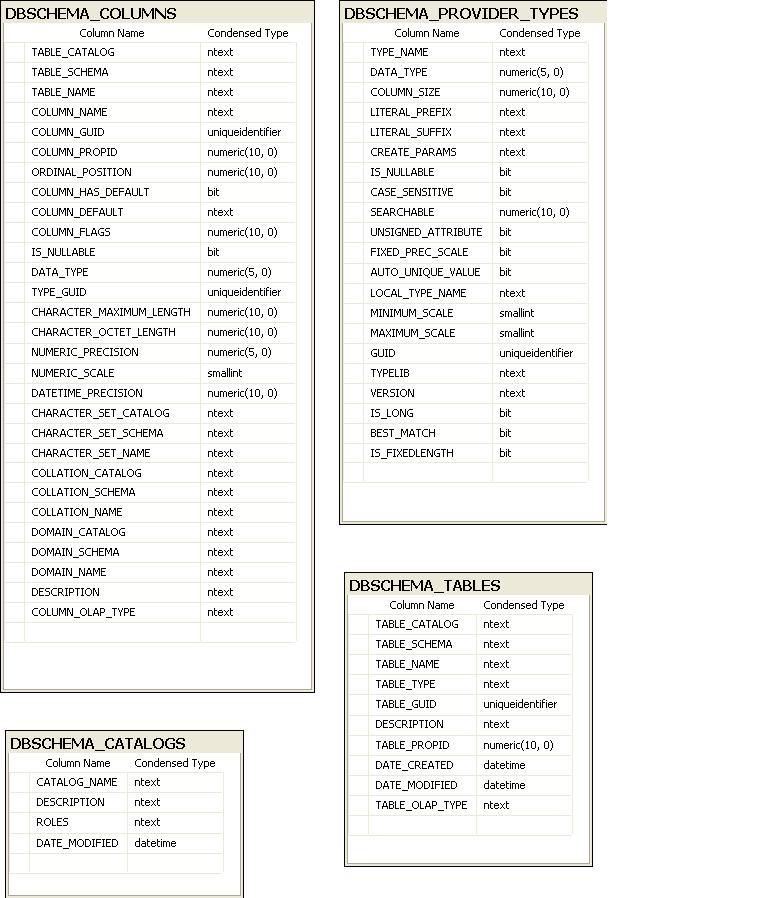
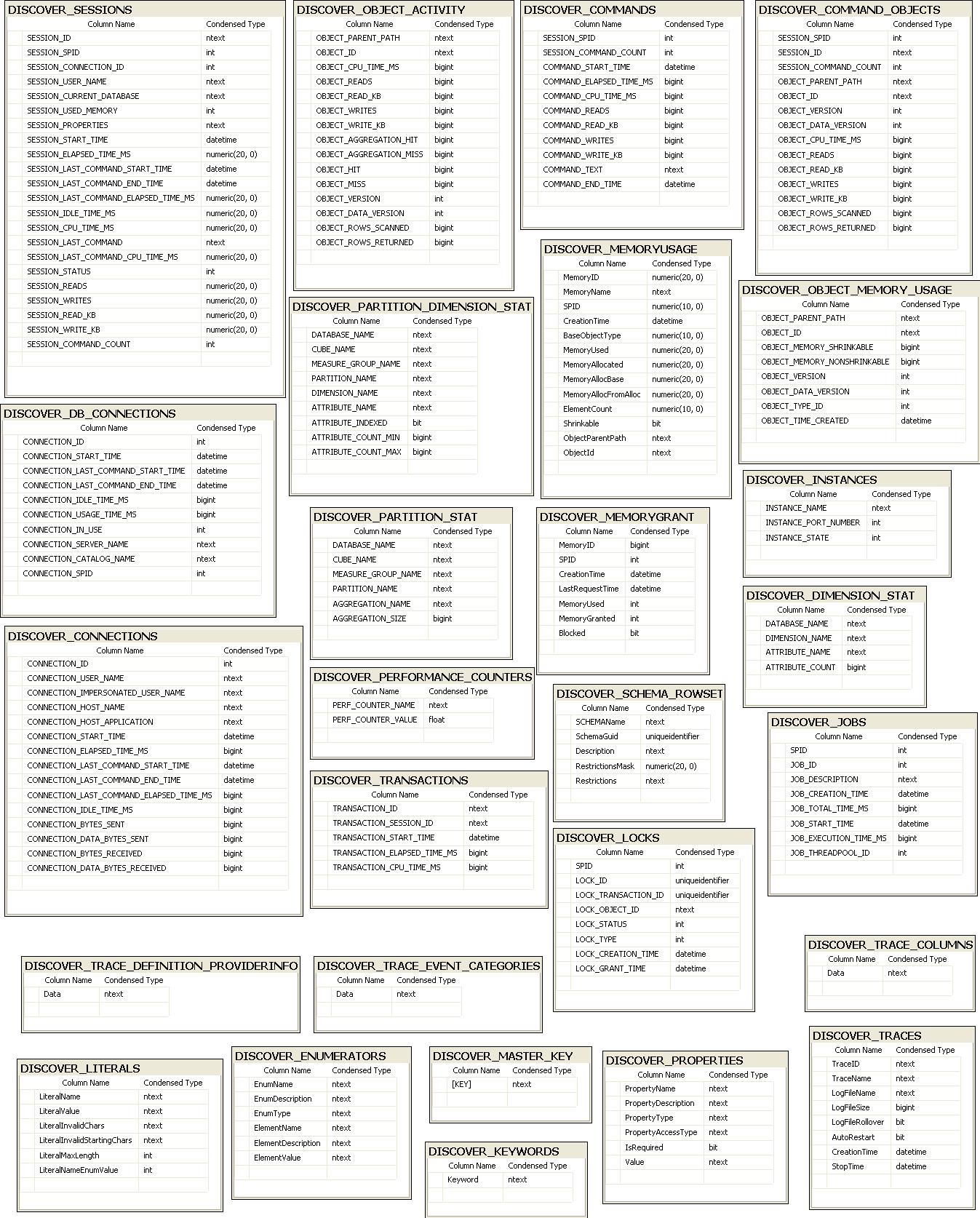
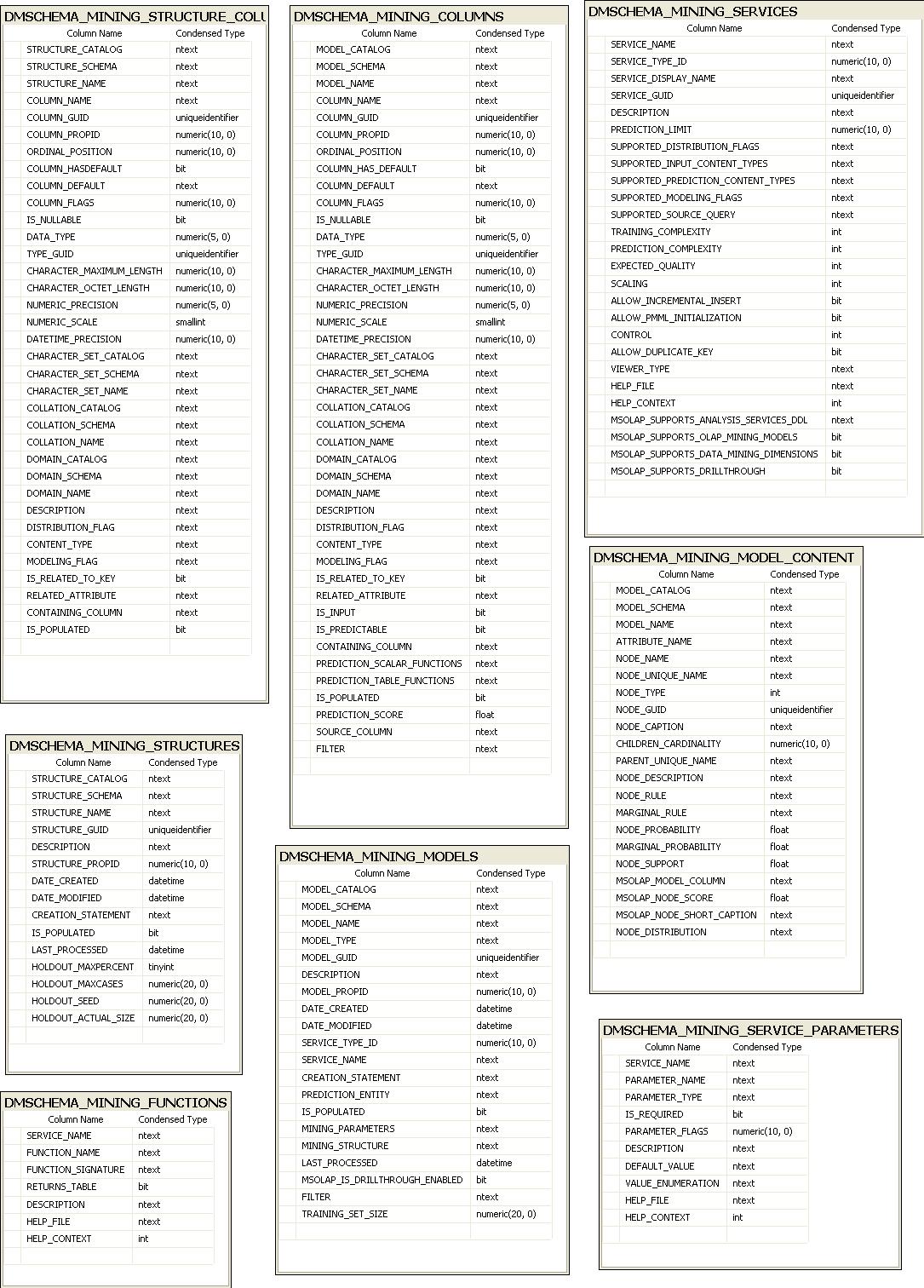
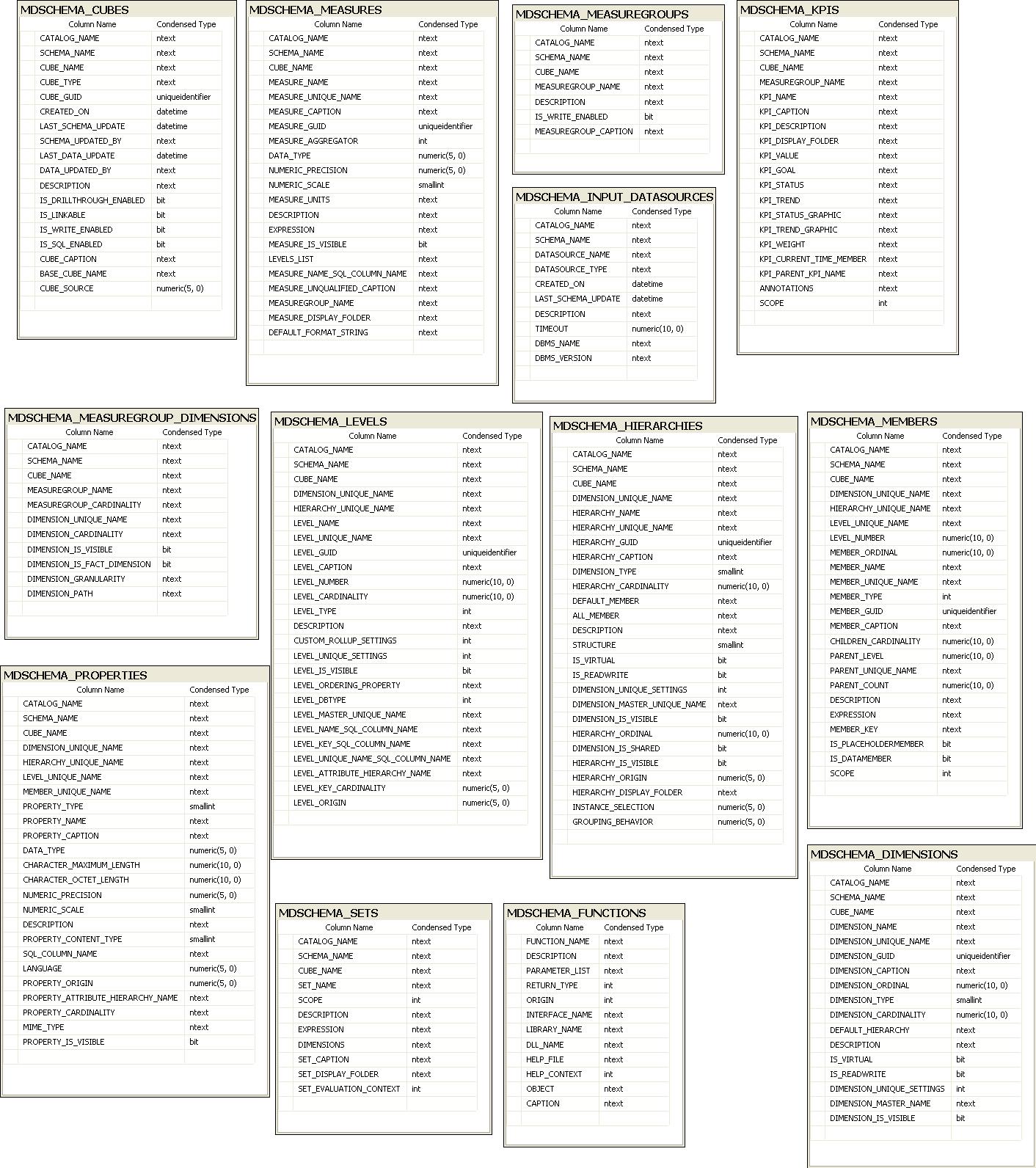
After this exercise I had SQL Server database with the SSAS DMVs structure. Based on these tables I created 4 database diagrams. I divided tables into database diagrams based on their name prefix.
DBSCHEMA tables:
DISCOVER tables
DMSCHEMA tables
MDSCHEMA tables
One thing that you will notice is that in all DMVs all string type fields are treated as type NTEXT. This will affect how you write queries from SQL Server. For example, if you execute following query:
SELECT *
FROM OPENQUERY(SSAS2008Test, ‘SELECT * FROM $system.dbschema_tables’) as s
WHERE TABLE_SCHEMA = N’$SYSTEM’
You will get this error message:
Msg 402, Level 16, State 1, Line 3
The data types ntext and nvarchar are incompatible in the equal to operator.
To get results you will have to adjust your query, for example by converting TABLE_SCHEMA field to varchar type:
SELECT *
FROM OPENQUERY(SSAS2008Test, ‘SELECT * FROM $system.dbschema_tables’) as s
WHERE SUBSTRING(TABLE_SCHEMA,1,100) = N’$SYSTEM’
Note: Database diagrams above do not have primary keys or relationships defined between them (yet).
July 24, 2008 Note: Some of the database diagrams were updated – I added missing DMVs.
Posted in SSAS 2008 - Katmai | 11 Comments »
July 24th, 2008 at 3:59 pm
Hi Vidas,
Thanks for the diagrams. This is pure gold :-)
Just one question:
Is it possible to query dimension usage structure (i.e. to get the connecting columns between measure group tables and dimension tables)?
I couldn’t figure it out…
Thanks in advance,
Elad
July 24th, 2008 at 8:58 pm
Elad,
I do not know exactly how to get information. But I can quickly point to DMVs that you should investigate.
First of all there is DMV $SYSTEM.MDSCHEMA_MEASUREGROUP_DIMENSIONS. This DMV had a links between measure groups and dimensions. Query Example:
SELECT [DIMENSION_UNIQUE_NAME], DIMENSION_GRANULARITY, *
FROM $SYSTEM.MDSCHEMA_MEASUREGROUP_DIMENSIONS
WHERE [DIMENSION_UNIQUE_NAME] = ‘[Sales Channel]’
AND MEASUREGROUP_NAME = ‘Sales Summary’
AND CUBE_NAME = ‘Sales Summary’
After you got your DIMENSION_UNIQUE_NAME and DIMENSION_GRANULARITY, you can use these values in the query against DMV $SYSTEM.MDSCHEMA_LEVELS:
SELECT TOP 100 *
FROM $SYSTEM.MDSCHEMA_LEVELS
WHERE [DIMENSION_UNIQUE_NAME] = ‘[Sales Channel]’
From this query you can use field LEVEL_KEY_SQL_COLUMN_NAME.
If you will figure out all the joins, please share it here.
July 25th, 2008 at 1:25 pm
Hi Vidas,
Thanks again for your help !
I was playing with the queries you suggested for a little while and, at this stage, it seems to me that I can get the relations assuming that dimension tables connect to measure group tables at granularity level (which is not always true).
If I get any conclusions about the matter, I will share it here.
April 20th, 2009 at 8:21 am
Good info Vidas,
Have you ever queried mining models via linked server? Can I use local SQL Server tables in a query involving the linked SSAS server? I’d like to do a prediction join over the link.
Suggestions?
Thanks,
Ed
April 20th, 2009 at 8:16 pm
Hi Ed,
I don’t have much experience with data mining. But my understanding is – queries on DMVs are actually based on DMX language. So you should have no problems (or I should say you will have the same problems as querying DMVs) querying your data mining model via linked in server. Again, I did not tried that myself.
August 26th, 2010 at 10:55 am
enjoy your ssas-info website tremendously – thanks!
I am interested in using DMVs to surface measure and dimension documentation to the user and was looking at your SSRS solution’s Dimension Detail report where you join Dimension, Level and Hierarchy, however I notice that it returns the dimensions in the database and not in the cube. This means that we do not see role-playing dimensions or the names of the dimensions in the cube (which may be different than those in the database).
If I replace your where clause WHERE LEFT(CUBE_NAME, 1) = ”$” with one that specifies a cube (or perspective)
WHERE CUBE_NAME = ”myCube”, I get the correct dimensions but it also is a cross-join of all attributes for each hierarchy and dimension…not what I expected.
Any idea why? What is the purpose of the $?
Thanks…
Ben
November 18th, 2010 at 11:19 am
Interesting stuff. Thanks for the information. Is there a schema table with user names and membership in access right groups?
November 10th, 2011 at 4:07 am
Hi Vidas,
Thank you for you sharing.
However, I get an error when I execute it on SSAS.
SELECT
function_name,
[Description],
Parameter_list,
return_type,
origin,
interface_name,
library_name,
dll_name,
Help_file,
help_context,
object,
[caption]
from $system.mdschema_FUNCTIONS
since this error, I can’t create SQL Server table to restore Function Schema.
Could you help me?
thank you very much.
November 10th, 2011 at 7:57 am
James,
I tested this on SQL Server 2008R2 SP1 and as you got error message. But I run same function on SQL 2008 without any problems. Clearly you found a bug in 2008R2 – please report it on connect.
November 10th, 2011 at 9:21 pm
Thanks Vidas. :)
December 23rd, 2011 at 4:20 am
Thanks for the info, we needed to check which of our SSAS databases aren’t backed up.