
Script to automate SSAS partition management (SQL + SSIS)
Introduction
Few years ago on my blog I posted scripts "SSIS Package to drop/create partitions based on partition list in the SQL Server table" and "SSIS package that process all partitions/measure groups/cubes in one database". These posts contained partial scripts that I developed for company "Insight Decision Solutions Inc." to maintain partitions in the Microsoft SQL Server Analysis Services. This company sells, customizes and implements pre-packaged data warehouse solution (using SQL Server, SSAS, SSIS, SSRS, SharePoint and Excel 2007) for "Life" and "Health" insurance companies. Recently "Insight Decision Solutions Inc." owners let me post full script on how to automate SSAS partition management . Here are step by step instructions that I adjusted and tested on Adventure Works database. Most of the code comes from my earlier published posts, here I just added information how everything works together.
My partition management script is divided into 2 parts. In the first part we will create a SQL Server table that contains a list of partitions that should exists in the SSAS database. Each record in this list fully describes partitions information - cube name, measure group name, unique partitions name and query that is used to populate that partition data. We will will create custom script to create such partition data based on initial information about specific database. In this article I provided sample logic on how I would populate such table for the sample Adventure Works database. Second part of this script is a SSIS package that will need very little customization. All you have to do is to point database connections to the proper databases on your environment.
Managing SSAS partition list in the SQL Server table
Our first goal is to create SQL Server tables and scripts that would populate and maintain SQL Server table with the list and metadata about each SSAS partition. When you need a new partition, all you need to do is create a record for that partition in the SQL Server database. When you want to drop existing partition, you will drop related record from partition list in the SQL Server.
Here are steps on how to manage this partition table:
1. We will create new database "SSASPartitions". This database will contain all SQL Server tables and scripts. Note: Normally these tables and scripts would be placed in your data warehouse database. , but in this demo case I decided not to touch existing Adventure Works database.
2. We will create new schema "config". I find that it is easier to manage related tables when they are under the same schema.
-- Create schema config.
CREATE SCHEMA [config] AUTHORIZATION [dbo];
GO
3. We will create new SQL Server table that will contain base information about each measure group in the SSAS database. We will have to populate records in this table for each implementation manually. Here is sample script:
IF OBJECT_ID('config.SSASPartitionsBase') IS NOT NULL DROP TABLE config.SSASPartitionsBase;
CREATE TABLE [config].[SSASPartitionsBase](
[CubeName] [varchar](100) NOT NULL,
[MeasureGroup] [varchar](100) NOT NULL,
[FactTableName] [varchar](3000) NOT NULL,
[PartitionFieldName] [varchar](100) NULL,
[TableStartDateKey] [int] NULL,
[LoadType1] [varchar](20) NULL,
[LoadType2] [varchar](20) NULL,
[LoadType3] [varchar](20) NULL,
CONSTRAINT [PK_SSASPartitionsBase] PRIMARY KEY CLUSTERED
([CubeName] ASC, [MeasureGroup] ASC)
)
GO
4. We will create SQL Server script to populate base table. We need one record for each measure group in the SSAS database. We need information in this table even for measure groups that will not be partitioned.
Field description:
- CubeName - name of the cube
- MeasureGroup - name of the measure group
- FactTableName - name of the fact table. In case when fact table is based on named query, you will need to specify here named query in the format: "(SELECT .. FROM <yourTableName> Where... ) X". In my implementation I always use SQL Server views to define fact table and in such case this field just contains name of that fact table view.
- PartitionFieldName - name of the field that is used for partitioning. This demo script expects that measure group will be partitioned just by 1 field. In this demo and in most cases on my production implementations I partition measure group based on the date. In measure group does not have partition, please set this field value to NULL.
- TableStartDateKey - minimum DateKey for this measure group. Partitions with dates before TableStartDateKey will not be created.
- LoadType1, LoadType2, LoadType3 - string representing load types. In many cases you do not load data warehouse at once - you might have different processes. These load type fields allows you to specify which measure groups are affected by each load type. Each measure group here can be affected by up to 3 different load types.
Here is query to populate this table for our Adventure Works sample:
TRUNCATE TABLE config.SSASPartitionsBase;
INSERT INTO config.SSASPartitionsBase(CubeName, MeasureGroup, FactTableName, PartitionFieldName, TableStartDateKey, LoadType1, LoadType2, LoadType3)
VALUES('Adventure Works','Exchange Rates' ,'[FactCurrencyRate]' , NULL , NULL , 'Sales',NULL, NULL)
INSERT INTO config.SSASPartitionsBase(CubeName, MeasureGroup, FactTableName, PartitionFieldName, TableStartDateKey, LoadType1, LoadType2, LoadType3)
VALUES('Adventure Works','Financial Reporting','[dbo].[FactFinance]' , NULL , NULL , 'Sales',NULL, NULL)
INSERT INTO config.SSASPartitionsBase(CubeName, MeasureGroup, FactTableName, PartitionFieldName, TableStartDateKey, LoadType1, LoadType2, LoadType3)
VALUES('Adventure Works','Internet Customers' ,'[dbo].[FactInternetSales]', 'OrderDateKey', '20010101', 'Sales',NULL, NULL)
INSERT INTO config.SSASPartitionsBase(CubeName, MeasureGroup, FactTableName, PartitionFieldName, TableStartDateKey, LoadType1, LoadType2, LoadType3)
VALUES('Adventure Works','Internet Orders' ,'[dbo].[FactInternetSales]', 'OrderDateKey', '20010101', 'Sales',NULL, NULL)
INSERT INTO config.SSASPartitionsBase(CubeName, MeasureGroup, FactTableName, PartitionFieldName, TableStartDateKey, LoadType1, LoadType2, LoadType3)
VALUES('Adventure Works','Internet Sales' ,'[dbo].[FactInternetSales]', 'OrderDateKey', '20010101', 'Sales',NULL, NULL)
INSERT INTO config.SSASPartitionsBase(CubeName, MeasureGroup, FactTableName, PartitionFieldName, TableStartDateKey, LoadType1, LoadType2, LoadType3)
VALUES('Adventure Works','Reseller Orders' ,'[dbo].[FactResellerSales]', 'OrderDateKey', '20010101', 'Reseller',NULL, NULL)
INSERT INTO config.SSASPartitionsBase(CubeName, MeasureGroup, FactTableName, PartitionFieldName, TableStartDateKey, LoadType1, LoadType2, LoadType3)
VALUES('Adventure Works','Reseller Sales' ,'[dbo].[FactResellerSales]', 'OrderDateKey', '20010101', 'Reseller',NULL, NULL)INSERT INTO config.SSASPartitionsBase(CubeName, MeasureGroup, FactTableName, PartitionFieldName, TableStartDateKey, LoadType1, LoadType2, LoadType3)
VALUES('Adventure Works','Sales Orders' ,'
(SELECT ProductKey, OrderDateKey, DueDateKey, ShipDateKey, ResellerKey, NULL AS CustomerKey, EmployeeKey, PromotionKey, CurrencyKey,
SalesTerritoryKey, SalesOrderNumber, SalesOrderLineNumber, RevisionNumber, OrderQuantity, UnitPrice, ExtendedAmount, UnitPriceDiscountPct,
DiscountAmount, ProductStandardCost, TotalProductCost, SalesAmount, TaxAmt, Freight, CarrierTrackingNumber, CustomerPONumber,
''Reseller'' AS SalesChannel, CONVERT(CHAR(10), SalesOrderNumber) + ''Line '' + CONVERT(CHAR(4), SalesOrderLineNumber) AS SalesOrderDesc
FROM FactResellerSales
UNION
SELECT ProductKey, OrderDateKey, DueDateKey, ShipDateKey, NULL AS ResellerKey, CustomerKey, NULL AS EmployeeKey, PromotionKey, CurrencyKey,
SalesTerritoryKey, SalesOrderNumber, SalesOrderLineNumber, RevisionNumber, OrderQuantity, UnitPrice, ExtendedAmount, UnitPriceDiscountPct,
DiscountAmount, ProductStandardCost, TotalProductCost, SalesAmount, TaxAmt, Freight, CarrierTrackingNumber, CustomerPONumber,
''Internet'' AS SalesChannel, CONVERT(CHAR(10), SalesOrderNumber) + ''Line '' + CONVERT(CHAR(4), SalesOrderLineNumber) AS SalesOrderDesc
FROM FactInternetSales) X
', 'OrderDateKey', '20010101', 'Sales',NULL, NULL)INSERT INTO config.SSASPartitionsBase(CubeName, MeasureGroup, FactTableName, PartitionFieldName, TableStartDateKey, LoadType1, LoadType2, LoadType3)
VALUES('Adventure Works','Sales Reasons' ,'[dbo].[FactInternetSalesReason]', NULL , NULL , 'Sales',NULL, NULL)
INSERT INTO config.SSASPartitionsBase(CubeName, MeasureGroup, FactTableName, PartitionFieldName, TableStartDateKey, LoadType1, LoadType2, LoadType3)
VALUES('Adventure Works','Sales Summary' ,'
(SELECT ProductKey, OrderDateKey, DueDateKey, ShipDateKey, ResellerKey, NULL AS CustomerKey, EmployeeKey, PromotionKey, CurrencyKey,
SalesTerritoryKey, SalesOrderNumber, SalesOrderLineNumber, RevisionNumber, OrderQuantity, UnitPrice, ExtendedAmount, UnitPriceDiscountPct,
DiscountAmount, ProductStandardCost, TotalProductCost, SalesAmount, TaxAmt, Freight, CarrierTrackingNumber, CustomerPONumber,
''Reseller'' AS SalesChannel, CONVERT(CHAR(10), SalesOrderNumber) + ''Line '' + CONVERT(CHAR(4), SalesOrderLineNumber) AS SalesOrderDesc
FROM FactResellerSales
UNION
SELECT ProductKey, OrderDateKey, DueDateKey, ShipDateKey, NULL AS ResellerKey, CustomerKey, NULL AS EmployeeKey, PromotionKey, CurrencyKey,
SalesTerritoryKey, SalesOrderNumber, SalesOrderLineNumber, RevisionNumber, OrderQuantity, UnitPrice, ExtendedAmount, UnitPriceDiscountPct,
DiscountAmount, ProductStandardCost, TotalProductCost, SalesAmount, TaxAmt, Freight, CarrierTrackingNumber, CustomerPONumber,
''Internet'' AS SalesChannel, CONVERT(CHAR(10), SalesOrderNumber) + ''Line '' + CONVERT(CHAR(4), SalesOrderLineNumber) AS SalesOrderDesc
FROM FactInternetSales) X
', 'OrderDateKey', '20010101', 'Sales',NULL, NULL)
INSERT INTO config.SSASPartitionsBase(CubeName, MeasureGroup, FactTableName, PartitionFieldName, TableStartDateKey, LoadType1, LoadType2, LoadType3)
VALUES('Adventure Works','Sales Targets' ,'(SELECT EmployeeKey, TimeKey AS OrderDateKey, CalendarQuarter, CalendarYear, SalesAmountQuota FROM FactSalesQuota) X' , NULL , NULL , 'Sales',NULL, NULL)
go
-- SELECT * FROM config.SSASPartitionsBase;
5. We will create SQL Server table that will contain the list of parititions in the SSAS database. We will later create a custom script that reads information from the base table and generates records in this table. Here is the script to create this table:
IF OBJECT_ID('config.SSASPartitions') IS NOT NULL DROP TABLE config.SSASPartitions;
CREATE TABLE [config].[SSASPartitions](
[CubeName] [varchar](100) NOT NULL,
[MeasureGroup] [varchar](100) NOT NULL,
[Partition] [varchar](100) NOT NULL,
[SQL] [varchar](3000) NOT NULL,
[MinDateKey] [int] NOT NULL,
[MaxDateKey] [int] NOT NULL,
[NeedsReProcessing] [bit] NOT NULL,
[LastProcessDate] [smalldatetime] NULL,
CONSTRAINT [PK_SSASPartitions] PRIMARY KEY CLUSTERED
([CubeName] ASC,[MeasureGroup] ASC, [Partition] ASC)
)
GO
6. We will create table for Date dimension. In most cases you will already have such table in your data warehouse. This table will be used in our custom script to create SSAS partition records.
IF OBJECT_ID('config.Date') IS NOT NULL DROP TABLE config.Date;
CREATE TABLE config.Date(
DateKey int NOT NULL PRIMARY KEY
, [Date] datetime NOT NULL
, MonthKey int NOT NULL
, YearKey int NOT NULL
)
go
7. We will populate table for Date dimension. Again, in most cases you will already have such table populated in your data warehouse. In Adventure Works database date dimension has values from 2001 January to 2004 July.
-- Will populate Date table with values for years 2001-2004
SET NOCOUNT ON
DECLARE @d datetime
SET @d = CONVERT(datetime, '20010101', 112)
WHILE @d <= CONVERT(datetime, '20040731', 112)
BEGIN
INSERT INTO config.Date(DateKey, [Date], MonthKey, YearKey)
SELECT CONVERT(int, CONVERT(varchar, @d, 112)) AS DateKey
, @d AS [Date]
, YEAR(@d) * 100 + MONTH(@d) AS MonthKey
, YEAR(@d) AS YearKey
SET @d = @d + 1
END
SET NOCOUNT OFF
go
-- SELECT * FROM config.Date
8. We will create and populate table that will hold value for the current load date. We need such table to be able to identify what is the latest load date in the data warehouse. In most cases you will already have such table in your data warehouse. Here is this script:
IF OBJECT_ID('config.CurrentLoadDate') IS NOT NULL DROP TABLE config.CurrentLoadDate;
CREATE TABLE config.CurrentLoadDate(
DateKey int
)
go
-- Table config.CurrentLoadDate will always have just one record
INSERT INTO config.CurrentLoadDate(DateKey) VALUES(20040731);
go
9. We will create custom script (stored procedure) that will calculate partitions that has to be created. This stored procedure accepts parameter @Action that should match LoadType1..3 in the config.SSASPartitionsBase table. Here is just a sample code to give you an idea on how you would populate table config.SSASPartitions. In my production script I have a code that add additional partitioning for specific field if the measure group name is like '%someting%'. You will adjust this script to your requirements.
IF EXISTS (SELECT name FROM sysobjects WHERE name = N'CalculateSSASPartitions' AND type = 'P')
DROP PROCEDURE dbo.CalculateSSASPartitions
GOCREATE PROCEDURE dbo.CalculateSSASPartitions
@Action varchar(50) = ''
WITH RECOMPILE
AS
BEGINSET NOCOUNT ON
PRINT 'Executing SP: CalculateSSASPartitions'IF ISNULL(@Action,'') NOT IN ('Sales','Reseller')
BEGIN
PRINT 'Current parameter @Action value: ' + ISNULL(@Action,'')
PRINT ' Expected values: Sales | Reseller'
RAISERROR('Incorrect @Action parameter value in SP: CalculateSSASPartitions',18,1)
RETURN
END-- ---------------------------------------------------------------------------------------
-- ---------------------------------------------------------------------------------------
-- ---------------------------------------------------------------------------------------
IF OBJECT_ID('tempdb..#tmpPart') IS NOT NULL DROP TABLE #tmpPart
CREATE TABLE #tmpPart (
CubeName varchar(100) NOT NULL
, MeasureGroup varchar(100) NOT NULL
, [Partition] varchar(200) NOT NULL
, [SQL] varchar(3000) NOT NULL
, MinDateKey int NOT NULL
, MaxDateKey int NOT NULL
)INSERT INTO #tmpPart(CubeName, MeasureGroup, [Partition], [SQL], MinDateKey, MaxDateKey)
SELECT P.CubeName, P.MeasureGroup
, P.MeasureGroup + ' ' + CONVERT(varchar, D.PartitionName) AS Partition
, 'SELECT * FROM ' + P.FactTableName + ' WHERE ' + P.PartitionFieldName
+ CASE WHEN MinDateKey = MaxDateKey THEN '=' + CONVERT(varchar, MinDateKey)
ELSE ' BETWEEN ' + CONVERT(varchar, D.MinDateKey) + ' AND ' + CONVERT(varchar, D.MaxDateKey)
END
AS SQL
-- , P.AggregationID
, CASE WHEN D.MinDateKey < P.TableStartDateKey THEN P.TableStartDateKey ELSE D.MinDateKey END AS MinDateKey
, D.MaxDateKey
FROM config.SSASPartitionsBase P
JOIN (
SELECT MonthKey AS PartitionName, MIN(DateKey) AS MinDateKey, MAX(DateKey) AS MaxDateKey
FROM config.Date
WHERE YearKey = (SELECT FLOOR(DateKey/10000) FROM config.CurrentLoadDate)
GROUP BY MonthKey
UNION ALL
SELECT YearKey AS PartitionName, MIN(DateKey) AS MinDateKey, MAX(DateKey) AS MaxDateKey
FROM config.Date
WHERE YearKey < (SELECT FLOOR(DateKey/10000) FROM config.CurrentLoadDate)
GROUP BY YearKey
) D ON D.MaxDateKey >= P.TableStartDateKey
WHERE P.PartitionFieldName IN ('OrderDateKey')
AND (P.LoadType1 = @Action OR P.LoadType2 = @Action OR P.LoadType3 = @Action)-- -------------------------------------------------
-- Add measure gruops that will not be partitioned
INSERT INTO #tmpPart(CubeName, MeasureGroup, [Partition], [SQL], MinDateKey, MaxDateKey)
SELECT P.CubeName, P.MeasureGroup, P.MeasureGroup AS Partition
, 'SELECT * FROM ' + P.FactTableName AS SQL
, 0 AS MinDateKey, 999999 AS MaxDateKey
FROM config.SSASPartitionsBase P
WHERE ISNULL(PartitionFieldName,'') = ''
AND (P.LoadType1 = @Action OR P.LoadType2 = @Action OR P.LoadType3 = @Action)-- Safety. If we miss any measure groups, add records as if they were not partitioned.
INSERT INTO #tmpPart(CubeName, MeasureGroup, [Partition], [SQL], MinDateKey, MaxDateKey)
SELECT CubeName, MeasureGroup, MeasureGroup AS [Partition], 'SELECT * FROM ' + FactTableName AS [SQL]
, 0 MinDateKey, 999999 MaxDateKey
FROM config.SSASPartitionsBase B
WHERE NOT EXISTS(SELECT * FROM #tmpPart T WHERE T.MeasureGroup = B.MeasureGroup)
AND (B.LoadType1 = @Action OR B.LoadType2 = @Action OR B.LoadType3 = @Action)-- ----------------------------------------------------------------------------------------------------------------------------------
DELETE FROM config.SSASPartitions
FROM config.SSASPartitions P
JOIN config.SSASPartitionsBase B ON B.CubeName = P.CubeName AND B.MeasureGroup = P.MeasureGroup
WHERE (B.LoadType1 = @Action OR B.LoadType2 = @Action OR B.LoadType3 = @Action)
AND NOT EXISTS(SELECT * FROM #tmpPart T WHERE T.CubeName = P.CubeName AND T.MeasureGroup = P.MeasureGroup
AND T.Partition = P.Partition)
PRINT 'Deleted partitions that do not exists in new list. Record count: ' + CONVERT(varchar, @@ROWCOUNT)INSERT INTO config.SSASPartitions(CubeName, MeasureGroup, [Partition], [SQL]
, MinDateKey, MaxDateKey, NeedsReProcessing)
SELECT CubeName, MeasureGroup, [Partition], [SQL]
, MinDateKey, MaxDateKey, 1 AS NeedsReProcessing
FROM #tmpPart T
WHERE NOT EXISTS(SELECT * FROM config.SSASPartitions P
WHERE P.CubeName = T.CubeName AND P.MeasureGroup = T.MeasureGroup
AND P.Partition = T.Partition
)
PRINT 'Inserted partitions that do not exists. Record count: ' + CONVERT(varchar, @@ROWCOUNT)
END
go
Above stored procedure creates yearly partition record for previous years data and monthly partition record for current years data. During the first load of the new year, all previous years monthly partitions will be dropped and new yearly partitions will be created instead.
10. Now you can execute this script to populate conig.SSASPartitions table. Here is script for that:
-- SELECT * FROM config.SSASPartitions
TRUNCATE TABLE config.SSASPartitions
EXEC dbo.CalculateSSASPartitions @Action='Sales'
EXEC dbo.CalculateSSASPartitions @Action='Reseller'
-- SELECT * FROM config.SSASPartitions
Normally you will add step to execute above stored procedure in your DW load package. It is quite easy to add custom logic to the above SP to also update NeedsReprocessing field to value 1 for partitions that were affected by your load and because of that needs re-processing.
SSIS Package to create/drop SSAS partitions based on the list
So, at this point we have a table config.SSASPartitions that describes each partition in SSAS database. This table will be used in our second part of the script that is developed as SSIS package. Our SSIS package will:
- read table config.SSASPartitions to get a list of partitions that should be in the SSAS database
- drop partitions that should not be in the SSAS database
- process all dimensions in SSAS database. If there will be at least one record in the table config.SSASPartitions that will have value NeedsReProcessing set to 1, then this script will do incremental dimension re-processing, otherwise it will do full dimension reprocessing.
- create partitions that do not exists in the SSAS database, but exists in the partition list
- process partitions that needs to be reprocessed
- update NeedsReProcessing flag in the config.SSASPartitions table.
Here is the screen shoot of this package:
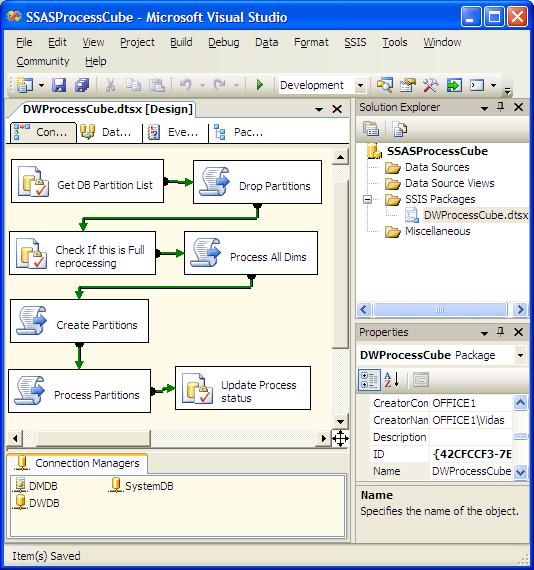
At the end of this post I added a link to full SSIS solution, and below are some explanations about this package:
Package Parameters:
- User:PartitionListInDW DataType: Object
- User:ThisIsFullReprocessing DataType: Boolean
Package connection objects:
- DWDB - ADO.NET (!) connection to SSASParititions database.
- SystemDB - connection for SSIS package loging
- DMDB - connection to SSAS database
Package tasks:
- SSIS "Execute SQL Task". Get DB Partition List
- SSIS "Script Task" - Drop Partitions
- SSIS "Execute SQL Task" - Calculate ThisIsFullReprocessing flag
- SSIS "Script Task" - Process All Dims
- SSIS "Script Task" - Create Partitions
- SSIS "Script Task" - Process Partitions
- SSIS "Execute SQL Task" - Update Process Status
1. Task GetDBParitionList. We query table config.SSASParititions and populate result into SSIS variable User:ParititonListInDW. Query:
SELECT CubeName,MeasureGroup, Partition, SQL, NeedsReProcessing FROM config.SSASPartitions ORDER BY 1,2,3
ResultSet: Full result set, Result set is mapped to variable "User:: PartitionListInDW"
2. Second SSIS package step drops partitions from SSAS database when there is no matching paritition record. For this task you need to pass variable PartitionListInDW:
-- SSIS "Script Task". Drop Partitions
ReadOnlyVariables: PartitionListInDWImports System
Imports System.Data
Imports System.Math
Imports Microsoft.SqlServer.Dts.RuntimeImports Microsoft.AnalysisServices
Public Class ScriptMain
Public Sub Main()
Dim ExecutionSuccessfull As Boolean = True ' If true, package executed without errors
Dim dataBytes(0) As ByteDim PartListInDM(999, 2) As String ' expecting no more than a 1000 partitions.
Dim DropPartCount As Integer = 0' Following objects are used to capture execution results
Dim oResults As Microsoft.AnalysisServices.XmlaResultCollection
Dim oResult As Microsoft.AnalysisServices.XmlaResult
Dim oMessage As Microsoft.AnalysisServices.XmlaMessageDim oPartitionList As Variable = Dts.Variables("PartitionListInDW") ' From variable
Dim oDS As DataSet = CType(oPartitionList.Value, DataSet)Dim oTbl As DataTable = oDS.Tables(0)
Dim oRow As DataRow
Dim oConnection As ConnectionManager
oConnection = Dts.Connections("DMDB")
Dim sServer As String = CStr(oConnection.Properties("ServerName").GetValue(oConnection))
Dim sDatabase As String = CStr(oConnection.Properties("InitialCatalog").GetValue(oConnection))Dim oServer As New Microsoft.AnalysisServices.Server
oServer.Connect(sServer) ' connect to the server and start scanning down the object hierarchy
Dim oDB As Microsoft.AnalysisServices.Database = oServer.Databases.FindByName(sDatabase)If oDB Is Nothing Then
Dts.Log("Did not find expected database: " & sDatabase, 0, dataBytes) ' You need to setup proper package loging to see this!
ExecutionSuccessfull = False
GoTo Done
End IfDim oCube As Microsoft.AnalysisServices.Cube
Dim oMeasureGroup As Microsoft.AnalysisServices.MeasureGroup
Dim oPartition As Microsoft.AnalysisServices.Partition
Dim bNeedToDropPartition As Boolean
For Each oCube In oDB.Cubes
For Each oMeasureGroup In oCube.MeasureGroups
For Each oPartition In oMeasureGroup.Partitions
' Check if this partition exists in our partition table
bNeedToDropPartition = True
' oTbl.Reset()
For Each oRow In oTbl.Rows
If oRow("CubeName").ToString = oCube.Name.ToString And oRow("MeasureGroup").ToString = oMeasureGroup.Name.ToString _
And oRow("Partition").ToString = oPartition.Name.ToString Then
bNeedToDropPartition = False ' Found partition in DW list, no need to drop it
Exit For
End If
Next
If bNeedToDropPartition Then
PartListInDM(DropPartCount, 0) = oCube.Name
PartListInDM(DropPartCount, 1) = oMeasureGroup.Name
PartListInDM(DropPartCount, 2) = oPartition.Name
DropPartCount = DropPartCount + 1
Dts.Log("Found partition that needs to be dropped: " & oPartition.Name, 0, dataBytes) ' You need to setup proper package loging to see this!
' oPartition.Drop()
End If
Next
Next
Next
' MsgBox(DropPartCount)oServer.CaptureXml() = True
Dim i As Integer = 0
For i = 0 To DropPartCount - 1
oCube = oDB.Cubes.FindByName(PartListInDM(i, 0))
oMeasureGroup = oCube.MeasureGroups.FindByName(PartListInDM(i, 1))
oPartition = oMeasureGroup.Partitions.FindByName(PartListInDM(i, 2))
oPartition.Drop()
Next i
oServer.CaptureXml() = False
' Executing log that contains all XMLA commands
oResults = oServer.ExecuteCaptureLog(True, False)'Log the errors and warnings
For Each oResult In oResults
For Each oMessage In oResult.Messages
If oMessage.GetType.Name = "XmlaError" Then
'The processing failed
Dts.Log(oMessage.Description, 0, dataBytes) ' You need to setup proper package loging to see this!
ExecutionSuccessfull = False
Else
'It’s just a warning.
Dts.Log(oMessage.Description, 0, dataBytes) ' You need to setup proper package loging to see this!
ExecutionSuccessfull = True ' if you want to fail on warning, change this to False
End If
Next oMessage
Next oResult
' Finished code that drops partitions
' -------------------------------------------------------------------------------------------------------------------------Done:
oServer.Disconnect()If ExecutionSuccessfull Then
Dts.TaskResult = Dts.Results.Success
Else
Dts.TaskResult = Dts.Results.Failure
End IfEnd Sub
End Class
3. Calculate ThisIsFullReprocessing flag. If there is at least one processed partitions (NeedsReProcessing<>1), that means this is incremental processing, otherwise it is full re-processing: SQL Query:
SELECT CONVERT(bit, CASE WHEN PartCount = 0 THEN 1 ELSE 0 END) AS NeedsFullReprocessing
FROM (SELECT COUNT(*) AS PartCount FROM config.SSASPartitions WHERE NeedsReProcessing <> 1) B
Note: ResultSet: Single Row, Result set is mapped to variable User::ThisIsFullReprocessing
4. Script to process all dimensions. Depends on the SSIS variable ThisIsFullReprocessing:
-- SSIS "Script Task" - Process All Dims
ReadOnlyVariables: ThisIsFullReprocessing
Script:
Imports System
Imports System.Data
Imports System.Math
Imports Microsoft.SqlServer.Dts.RuntimePublic Class ScriptMain
Public Sub Main()
Dim ExecutionSuccessfull As Boolean = True ' If true, package executed without errors
Dim dataBytes(0) As Byte
' Dim sProcessType As String = "ProcessFull"Dim oConnection As ConnectionManager
oConnection = Dts.Connections("DMDB")
Dim sServer As String = CStr(oConnection.Properties("ServerName").GetValue(oConnection))
Dim sDatabaseID As String = CStr(oConnection.Properties("InitialCatalog").GetValue(oConnection))
Dim oServer As New Microsoft.AnalysisServices.Server
oServer.Connect(sServer) ' connect to the server and start scanning down the object hierarchy
Dim oDB As Microsoft.AnalysisServices.Database = oServer.Databases.FindByName(sDatabaseID)Dim oThisIsFullReprocessing As Variable = Dts.Variables("ThisIsFullReprocessing") ' From variable
Dim ThisIsFullReprocessing As Boolean = CType(oThisIsFullReprocessing.Value, Boolean)Dim ProcessType As Microsoft.AnalysisServices.ProcessType
If ThisIsFullReprocessing Then
ProcessType = Microsoft.AnalysisServices.ProcessType.ProcessFull
Dts.Log("Will be doing FULL dimension processing", 0, dataBytes) ' You need to setup proper package loging to see this!
Else
ProcessType = Microsoft.AnalysisServices.ProcessType.ProcessUpdate
Dts.Log("Will be doing UPDATE dimension processing", 0, dataBytes) ' You need to setup proper package loging to see this!
End IfIf oDB Is Nothing Then
ExecutionSuccessfull = False
GoTo Done
Else
Dim oDim As Microsoft.AnalysisServices.DimensionoServer.CaptureXml() = True ' Start capturing XML.
For Each oDim In oDB.Dimensions
' This will generate XMLA, but because CaptureXML is True, will not execute it!
If (oDim.MiningModel Is Nothing) Then
oDim.Process(ProcessType)
End IfNext
oServer.CaptureXml() = False ' Stop capturing XML
' Execute captured XML. First parameter Transactional, second parameter Parallel, third optional parameter: processAffected
' These are very important parameters!Dim oResults As Microsoft.AnalysisServices.XmlaResultCollection
Dim oResult As Microsoft.AnalysisServices.XmlaResultoResults = oServer.ExecuteCaptureLog(True, True)
'oResults = oServer.ExecuteCaptureLog(False, False)Dim oMessage As Microsoft.AnalysisServices.XmlaMessage
Dim bt(0) As Byte
'Log the errors and warnings
For Each oResult In oResults
For Each oMessage In oResult.Messages
If oMessage.GetType.Name = "XmlaError" Then
Dts.Log(oMessage.Description, 0, bt)'The processing failed
ExecutionSuccessfull = False
Else
'It's just a warning.
Dts.Log(oMessage.Description, 0, bt)
ExecutionSuccessfull = True ' if you want to fail on warning, change this to False
End If
Next oMessage
Next oResultEnd If
Done:
oServer.Disconnect() ' disconnect from the server -- we are doneIf ExecutionSuccessfull Then
Dts.TaskResult = Dts.Results.Success
Else
Dts.TaskResult = Dts.Results.Failure
End If
End SubEnd Class
5. SSIS Script to create partitions that are in the table config.SSASPartitions, but does not exists in the SSAS database:
-- SSIS "Script Task" - Create Partitions
ReadOnlyVariables: PartitionListInDW
Script:Imports System
Imports System.Data
Imports System.Math
Imports Microsoft.SqlServer.Dts.RuntimeImports Microsoft.AnalysisServices
Public Class ScriptMain
Public Sub Main()
Dim ExecutionSuccessfull As Boolean = True ' If true, package executed without errors
Dim dataBytes(0) As Byte' Following objects are used to capture execution results
Dim oResults As Microsoft.AnalysisServices.XmlaResultCollection
Dim oResult As Microsoft.AnalysisServices.XmlaResult
Dim oMessage As Microsoft.AnalysisServices.XmlaMessageDim oPartitionList As Variable = Dts.Variables("PartitionListInDW") ' From variable
Dim oDS As DataSet = CType(oPartitionList.Value, DataSet)Dim oTbl As DataTable = oDS.Tables(0)
Dim oRow As DataRow
Dim oConnection As ConnectionManager
oConnection = Dts.Connections("DMDB")
Dim sServer As String = CStr(oConnection.Properties("ServerName").GetValue(oConnection))
Dim sDatabase As String = CStr(oConnection.Properties("InitialCatalog").GetValue(oConnection))Dim oServer As New Microsoft.AnalysisServices.Server
oServer.Connect(sServer) ' connect to the server and start scanning down the object hierarchy
Dim oDB As Microsoft.AnalysisServices.Database = oServer.Databases.FindByName(sDatabase)If oDB Is Nothing Then
Dts.Log("Did not find expected database: " & sDatabase, 0, dataBytes) ' You need to setup proper package loging to see this!
ExecutionSuccessfull = False
GoTo Done
End IfDim oCube As Microsoft.AnalysisServices.Cube
Dim oMeasureGroup As Microsoft.AnalysisServices.MeasureGroup
Dim oPartition As Microsoft.AnalysisServices.PartitionoServer.CaptureXml() = True
For Each oRow In oTbl.Rows
oCube = oDB.Cubes.FindByName(oRow("CubeName").ToString)
If oCube Is Nothing Then
Dts.Log("Did not find cube: " & oRow("CubeName").ToString, 0, dataBytes) ' You need to setup proper package loging to see this!
Continue For
End If
oMeasureGroup = oCube.MeasureGroups.FindByName(oRow("MeasureGroup").ToString)
If oMeasureGroup Is Nothing Then
Dts.Log("Did not find measure group: " & oRow("MeasureGroup").ToString, 0, dataBytes) ' You need to setup proper package loging to see this!
Continue For
End If
oPartition = oMeasureGroup.Partitions.FindByName(oRow("Partition").ToString)
If (oPartition Is Nothing) Then
Dts.Log("Need to create partition: " & oRow("Partition").ToString, 0, dataBytes) ' You need to setup proper package loging to see this!
oPartition = oMeasureGroup.Partitions.Add(oRow("Partition").ToString)
oPartition.StorageMode = StorageMode.Molap
oPartition.Source = New QueryBinding(oDB.DataSources(0).ID, oRow("SQL").ToString)
If oMeasureGroup.AggregationDesigns.Count > 0 Then '
oPartition.AggregationDesignID = oMeasureGroup.AggregationDesigns(0).ID ' Taking first available aggregation design!
End If
oPartition.Update(UpdateOptions.ExpandFull)
End If
Next
oServer.CaptureXml() = False' Executing log that contains all XMLA commands
oResults = oServer.ExecuteCaptureLog(True, False)'Log the errors and warnings
For Each oResult In oResults
For Each oMessage In oResult.Messages
If oMessage.GetType.Name = "XmlaError" Then
'The processing failed
Dts.Log(oMessage.Description, 0, dataBytes) ' You need to setup proper package loging to see this!
ExecutionSuccessfull = False
Else
'It’s just a warning.
Dts.Log(oMessage.Description, 0, dataBytes) ' You need to setup proper package loging to see this!
ExecutionSuccessfull = True ' if you want to fail on warning, change this to False
End If
Next oMessage
Next oResult
' Finished code that creates new partitions
' -------------------------------------------------------------------------------------------------------------------------Done:
oServer.Disconnect()If ExecutionSuccessfull Then
Dts.TaskResult = Dts.Results.Success
Else
Dts.TaskResult = Dts.Results.Failure
End IfEnd Sub
End Class
6. SSIS Script to process all partitions that has flag NeedsReProcessign = 1
-- SSIS "Script Task" - Process Partitions
ReadOnlyVariables: PartitionListInDW
Script:Imports System
Imports System.Data
Imports System.Math
Imports Microsoft.SqlServer.Dts.RuntimeImports Microsoft.AnalysisServices
Public Class ScriptMain
Public Sub Main()
Dim ExecutionSuccessfull As Boolean = True ' If true, package executed without errors
Dim dataBytes(0) As Byte' Following objects are used to capture execution results
Dim oResults As Microsoft.AnalysisServices.XmlaResultCollection
Dim oResult As Microsoft.AnalysisServices.XmlaResult
Dim oMessage As Microsoft.AnalysisServices.XmlaMessageDim oErrorConfig As Microsoft.AnalysisServices.ErrorConfiguration
Dim oPartitionList As Variable = Dts.Variables("PartitionListInDW") ' From variable
Dim oDS As DataSet = CType(oPartitionList.Value, DataSet)Dim oTbl As DataTable = oDS.Tables(0)
Dim oRow As DataRow
Dim oConnection As ConnectionManager
oConnection = Dts.Connections("DMDB")
Dim sServer As String = CStr(oConnection.Properties("ServerName").GetValue(oConnection))
Dim sDatabase As String = CStr(oConnection.Properties("InitialCatalog").GetValue(oConnection))Dim oServer As New Microsoft.AnalysisServices.Server
oServer.Connect(sServer) ' connect to the server and start scanning down the object hierarchy
Dim oDB As Microsoft.AnalysisServices.Database = oServer.Databases.FindByName(sDatabase)If oDB Is Nothing Then
Dts.Log("Did not find expected database: " & sDatabase, 0, dataBytes) ' You need to setup proper package loging to see this!
ExecutionSuccessfull = False
GoTo Done
End IfDim oCube As Microsoft.AnalysisServices.Cube
Dim oMeasureGroup As Microsoft.AnalysisServices.MeasureGroup
Dim oPartition As Microsoft.AnalysisServices.PartitionoServer.CaptureXml() = True
For Each oRow In oTbl.Rows
If LCase(oRow("NeedsReProcessing").ToString) = LCase("False") Then
Continue For
End IfoCube = oDB.Cubes.FindByName(oRow("CubeName").ToString)
If oCube Is Nothing Then
Dts.Log("Did not find cube: " & oRow("CubeName").ToString, 0, dataBytes) ' You need to setup proper package loging to see this!
Continue For
End IfoMeasureGroup = oCube.MeasureGroups.FindByName(oRow("MeasureGroup").ToString)
If oMeasureGroup Is Nothing Then
Dts.Log("Did not find measure group: " & oRow("MeasureGroup").ToString, 0, dataBytes) ' You need to setup proper package loging to see this!
Continue For
End IfoPartition = oMeasureGroup.Partitions.FindByName(oRow("Partition").ToString)
If (oPartition Is Nothing) Then
Dts.Log("Partition does not exists: " & oRow("Partition").ToString, 0, dataBytes) ' You need to setup proper package loging to see this!
Continue For
End IfoPartition.Process(Microsoft.AnalysisServices.ProcessType.ProcessFull)
Next' Dealing with linked measure groups.
For Each oCube In oDB.Cubes
For Each oMeasureGroup In oCube.MeasureGroups
If oMeasureGroup.IsLinked Then
oMeasureGroup.Process(Microsoft.AnalysisServices.ProcessType.ProcessDefault)
End If
Next
NextoServer.CaptureXml() = False
' Executing log that contains all XMLA commands
oResults = oServer.ExecuteCaptureLog(True, True)
'oResults = oServer.ExecuteCaptureLog(False, False)'Log the errors and warnings
For Each oResult In oResults
For Each oMessage In oResult.Messages
If oMessage.GetType.Name = "XmlaError" Then
'The processing failed
Dts.Log(oMessage.Description, 0, dataBytes) ' You need to setup proper package loging to see this!
ExecutionSuccessfull = False
Else
'It’s just a warning.
Dts.Log(oMessage.Description, 0, dataBytes) ' You need to setup proper package loging to see this!
ExecutionSuccessfull = True ' if you want to fail on warning, change this to False
End If
Next oMessage
Next oResult
' Finished code that process measure groups
' -------------------------------------------------------------------------------------------------------------------------' -------------------------
' Block of code to deal with linked measure groups
' -------------------------
'Dim oServer2 As New Microsoft.AnalysisServices.Server
'oServer2.Connect(sServer) ' connect to the server and start scanning down the object hierarchy
'Dim oDB2 As Microsoft.AnalysisServices.Database = oServer.Databases.FindByName(sDatabase)
'Dim oCube2 As Microsoft.AnalysisServices.Cube
'Dim oMeasureGroup2 As Microsoft.AnalysisServices.MeasureGroup
'For Each oCube2 In oDB2.Cubes
' For Each oMeasureGroup2 In oCube2.MeasureGroups
' If oMeasureGroup2.IsLinked Then
' oMeasureGroup2.Process(Microsoft.AnalysisServices.ProcessType.ProcessFull)
' End If
' Next
'NextDone:
oServer.Disconnect()If ExecutionSuccessfull Then
Dts.TaskResult = Dts.Results.Success
Else
Dts.TaskResult = Dts.Results.Failure
End IfEnd Sub
End Class
7. Reset NeedsReProcessingFlag in the table config.SSASPartitions to 0:
UPDATE config.SSASPartitions SET NeedsReProcessing = 0
Conclusion
Please use code provided here at your own risk. I must warn you that if you will run this SSIS package when config.SSASPartitions table is not populated, all of your partitions will be dropped. So always make sure that you have a backup of your database.
List of known issues:
- This script does not set partition slice property.
- This script does processing at the partition level. If for any reasons you will not have partitions listed in the config.SSASPartitions table during SSIS package execution, then you will end up with the measure groups without partitions.
Downloads
As always - please leave your comments if you found any issues, have suggestions or if you found this post helpful.