
Analysis Services 2008 $SYSTEM.DISCOVER_% DMVs
This post is based on SQL Server 2008 RC0.
In Analysis Services 2008 there 27 Discover DMVs. These are DMVs in $SYSTEM schema that have name start with "DISCOVER_". In SQL Server 2008 I created linked server to Analysis Services 2008:
EXEC master.dbo.sp_addlinkedserver
@server = N'SSAS2008Test'
, @srvproduct=N'MSOLAP'
, @provider=N'MSOLAP'
, @datasrc=N'VirtualPC1'
, @catalog=N'Adventure Works DW'
go
EXEC master.dbo.sp_addlinkedsrvlogin
@rmtsrvname=N'SSAS2008Test'
, @useself=N'False'
, @locallogin=NULL
, @rmtuser=NULL
, @rmtpassword=NULL
go
Then I used "SELECT * INTO dbo.<TableName> FROM OPENQUERY(SSAS2008Test, 'SELECT * FROM $SYSTEM.<TableName>'). For new tables in SQL Server I created database diagram that you can download below:
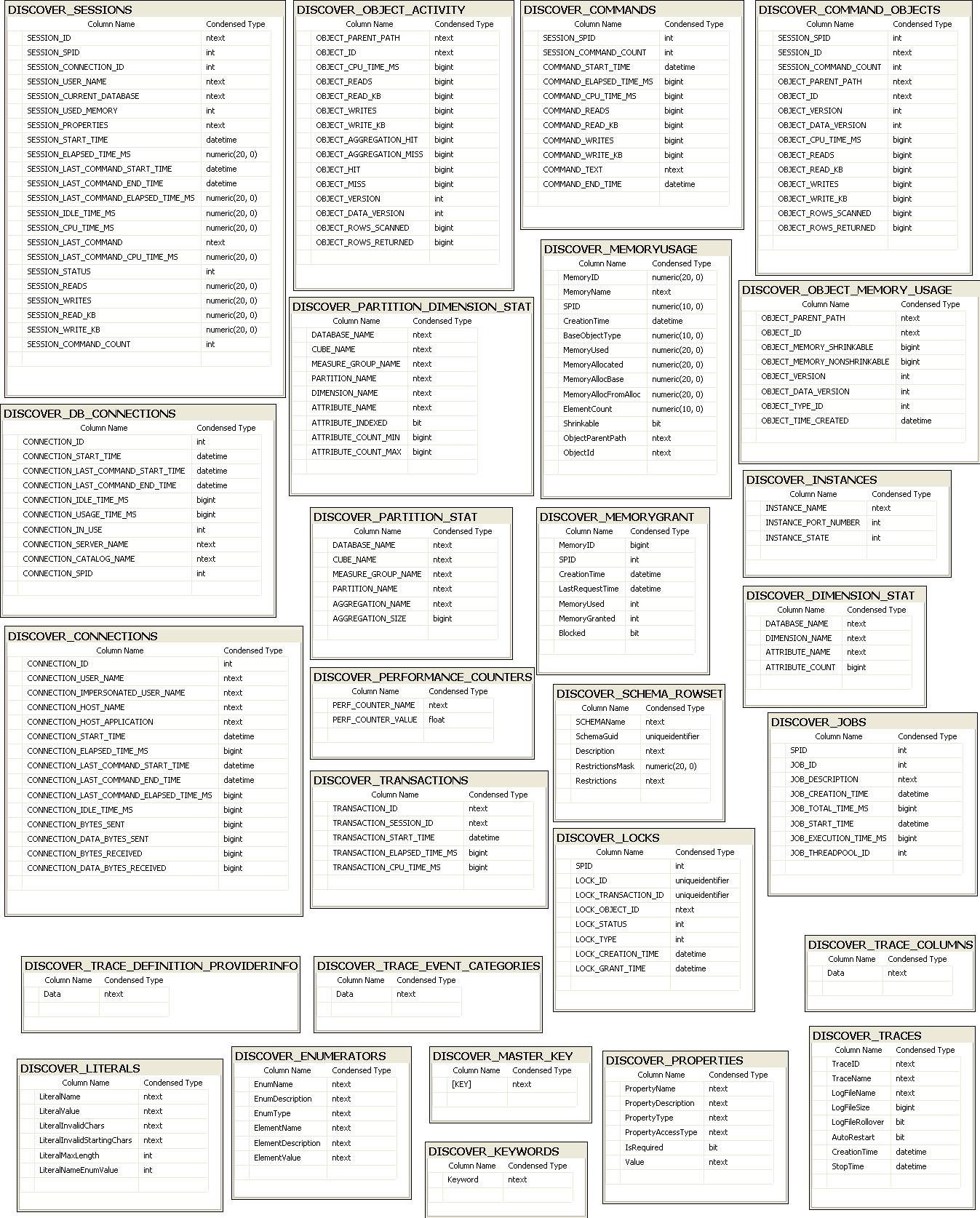
To get a list of SQL 2008 $SYSTEM.DISCOVER_% DMVs start SQL Server 2008 Management Studio, connect to Analysis Services server and create new MDX query:
SELECT TABLE_NAME
FROM $system.dbschema_tables
WHERE TABLE_SCHEMA = '$SYSTEM'
AND LEFT(TABLE_NAME,8) = 'DISCOVER'
ORDER BY table_name
You will get result consisting of 27 table names:
TABLE_NAME
DISCOVER_COMMAND_OBJECTS
DISCOVER_COMMANDS
DISCOVER_CONNECTIONS
DISCOVER_DB_CONNECTIONS
DISCOVER_DIMENSION_STAT
DISCOVER_ENUMERATORS
DISCOVER_INSTANCES
DISCOVER_JOBS
DISCOVER_KEYWORDS
DISCOVER_LITERALS
DISCOVER_LOCKS
DISCOVER_MASTER_KEY
DISCOVER_MEMORYGRANT
DISCOVER_MEMORYUSAGE
DISCOVER_OBJECT_ACTIVITY
DISCOVER_OBJECT_MEMORY_USAGE
DISCOVER_PARTITION_DIMENSION_STAT
DISCOVER_PARTITION_STAT
DISCOVER_PERFORMANCE_COUNTERS
DISCOVER_PROPERTIES
DISCOVER_SCHEMA_ROWSETS
DISCOVER_SESSIONS
DISCOVER_TRACE_COLUMNS
DISCOVER_TRACE_DEFINITION_PROVIDERINFO
DISCOVER_TRACE_EVENT_CATEGORIES
DISCOVER_TRACES
DISCOVER_TRANSACTIONS