
MDX-How can I change currency symbol based on selected currency dimension member
Q: How can I change currency symbol based on selected currency dimension member
A: This can be done using Language() MDX function.
First lets clarify the problem.
- Open Adventure Works solution in Business Intelligence Development Studio (BIDS)
- Open cube "Adventure Works". Go to Browser tab.
- Into measures area drop in measure "Internet Sales Amount" from measure group "Internet Sales"
- Drop "Destination Currency" dimension into row area.
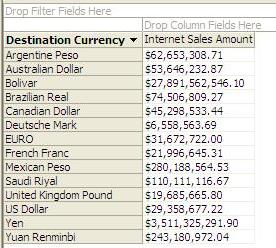
- As result you will see that measures for all currencies have $ symbol:
Solutions
There are few ways to solve this problem.
Option 1: Hard code language to locale mapping in MDX script:
- In BIDS open cube "Adventure Works".
- Go to calculations tab and change view from "Form View" to "Script View"
- After first "ALTER Cube..." statement add following statement:
Language([Destination Currency].[Destination Currency].&[Brazilian Real]) = 1046;
Language([Destination Currency].[Destination Currency].&[Canadian Dollar]) = 4105;
Language([Destination Currency].[Destination Currency].&[Deutsche Mark]) = 1031;
Language([Destination Currency].[Destination Currency].&[EURO]) = 2067;
Language([Destination Currency].[Destination Currency].&[French Franc]) = 1036;
Language([Destination Currency].[Destination Currency].&[Mexican Peso]) = 2058;
Language([Destination Currency].[Destination Currency].&[Saudi Riyal]) = 1025;
Language([Destination Currency].[Destination Currency].&[United Kingdom Pound]) = 2057;
Language([Destination Currency].[Destination Currency].&[US Dollar]) = 1033;
Language([Destination Currency].[Destination Currency].&[Yen]) = 1041;
Language([Destination Currency].[Destination Currency].&[Yuan Renminbi]) = 2052;
- Deploy project
- Check results of query defined above.
Option 2: Save mapping of LocaleID as Currency member attribute and then use it in MDX.
- In BIDS open data source view "Adventure Works.dsv"
- Select table "DimDimensionCurrency" and then right mouse click and choose "Edit Named Query...". In SQL Server 2005 SP2 default query for this dimension was:
SELECT CurrencyKey, CurrencyAlternateKey, CurrencyName
FROM DimCurrency
WHERE (CurrencyKey IN (SELECT DISTINCT CurrencyKey FROM FactCurrencyRate))
- In this query we need to introduce mapping between currency and Locale ID. List of Locale IDs can be found on Internet (example). Normally such mapping would be done during ETL, but for this demo purpose we can do it in query:
SELECT CurrencyKey, CurrencyAlternateKey, CurrencyName
, CASE CurrencyAlternateKey
WHEN 'ARS' THEN '11274' WHEN 'AUD' THEN '3081' WHEN 'DEM' THEN '1031'
WHEN 'GBP' THEN '2057' WHEN 'MXN' THEN '2058' WHEN 'CAD' THEN '4105'
WHEN 'SAR' THEN '1025' WHEN 'EUR' THEN '2067' WHEN 'FRF' THEN '1036'
WHEN 'BRL' THEN '1046' WHEN 'JPY' THEN '1041' WHEN 'CNY' THEN '2052'
WHEN 'VEB' THEN '16394' WHEN 'USD' THEN '1033'
END AS LocaleID
FROM DimCurrency
WHERE (CurrencyKey IN (SELECT DISTINCT CurrencyKey FROM FactCurrencyRate))
- Save and close data source view
- Open dimension "Destination Currency" in dimension editor
- Add new attribute "Locale ID" based on LocaleID field
- Change attribute property "AttributeHierarchyEnabled" value to False
- By default there is a relationship between key attribute "Destination Currency Code" and "Locale ID". Move "Locale ID" attribute relationship, so it depends on "Destination Currency" attribute.
- Open cube "Adventure Workds". Go to calculations tab and change view from "Form View" to "Script View"
- After first "ALTER Cube..." statement add following statement:
SCOPE ([Destination Currency].[Destination Currency].[Destination Currency].Members);
Language(This) = [Destination Currency].[Destination Currency].[Locale ID].MemberValue;
END SCOPE;
- Scope statement above changes Language settings for "Destination Currency" dimension members based on member property "Locale ID".
- Deploy all changes.
- Go back to cubes browser tab and refresh query results.
Both options will produce the same results and now you will see that currency sign depends on currency member:
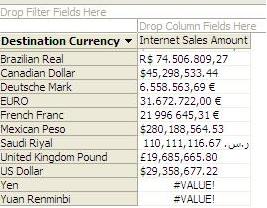
- As you can see from the image, my results show error for "Yen" and "Yuan Renminbi" currencies. This is because my computer does not have regional information about these Locale IDs.
Note: More information on how to use Language function you can find in Mosha Pasumansky blog.