
A Different Approach To Last-Ever Non-Empty in DAX
Reposted from Chris Webb's blog with the author's permission.
The post I wrote on the last-ever non-empty problem in MDX has been by far the most popular post I've ever written. It was the most popular post on my blog in 2012, and I wrote it in 2011! I hadn't thought about how to solve the problem in DAX though, and when a few months ago Javier Guillen wrote an excellent post on exactly this subject I thought it wasn't worth bothering with any more.
However, I changed my mind when was writing some DAX for a PowerPivot project recently and came across a totally different way to solve this problem which I thought I should write about. I'm not sure whether this approach is better or worse than Javier's in terms of performance or maintainability, but it returns the same values as my original MDX solution and I'm sure those of you out there who like DAX would be interested in seeing it.
First of all, here's the SSAS Tabular model I'm using for this post, which uses data from Adventure Works DW:
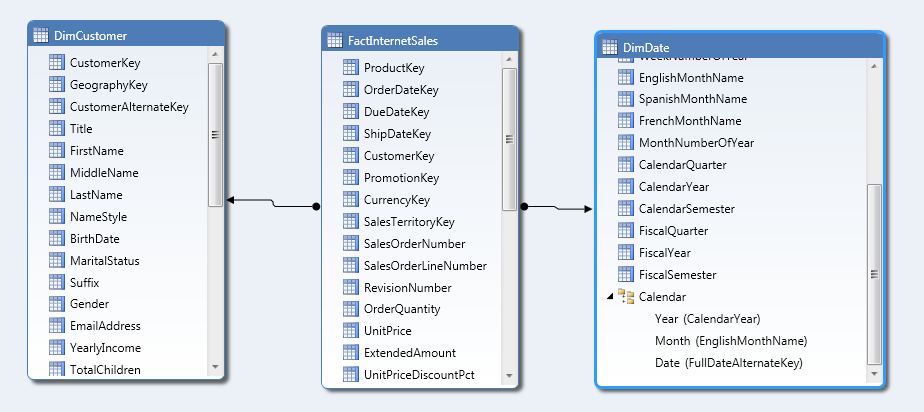
At the core of this approach is the idea that when you're searching for the last non empty date on which a sale was made, all you need to do is this:
- Find the table of dates from the beginning of time up to the current date on your Date dimension table, then
- Find the last date from the date key column on your fact table (the column which joins onto the key column on your dimension table) in the context established by the table found in the previous step
Here's a simple measure that illustrates this approach:
Last Ever Sales Date:=
CALCULATE(
LASTDATE(FactInternetSales[OrderDate])
, DATESBETWEEN(DimDate[FullDateAlternateKey], BLANK(), LASTDATE(DimDate[FullDateAlternateKey]))
,ALL(DimDate)
)
Running the following MDX query against the Tabular model (yes, I know, I'm using an MDX query, but wanted to have Customers on columns for testing purposes!) shows that it does indeed return the last ever non empty sales date:
SELECT
HEAD([DimCustomer].[Customer].[Customer].MEMBERS, 3)
*
{[Measures].[Sum of Sales Amount], [Measures].[Last Ever Sales Date]}
ON 0,
[DimDate].[FullDateAlternateKey].[FullDateAlternateKey].MEMBERS
ON 1
FROM [Model]
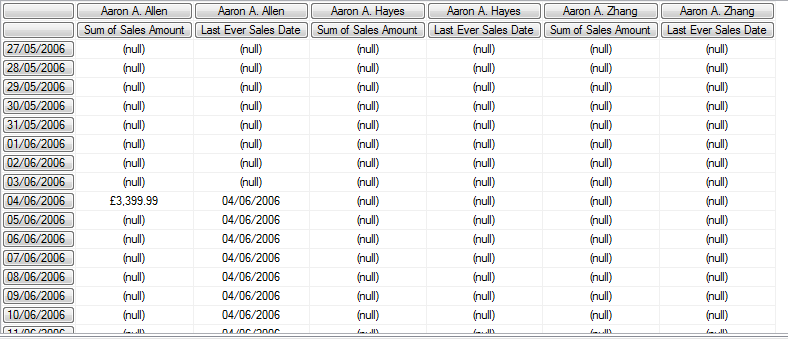
If we then want to return the value of [Sum of Sales Amount] for the last ever non empty date, then we just need to do this:
LENE Sales Date:=
CALCULATE([Sum of Sales Amount]
, CALCULATETABLE(
LASTDATE(FactInternetSales[OrderDate])
, DATESBETWEEN(DimDate[FullDateAlternateKey], BLANK(), LASTDATE(DimDate[FullDateAlternateKey]))
,ALL(DimDate))
, ALL(DIMDATE)
)
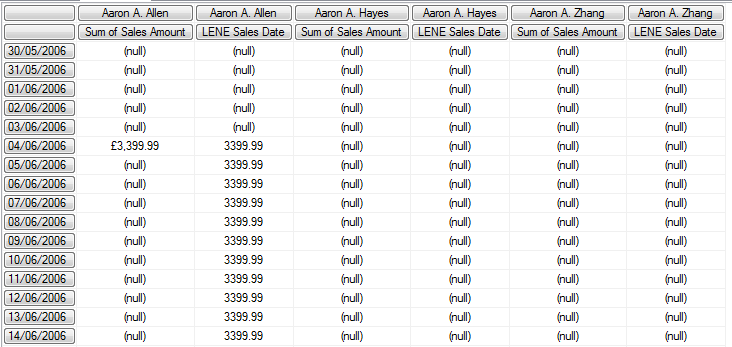
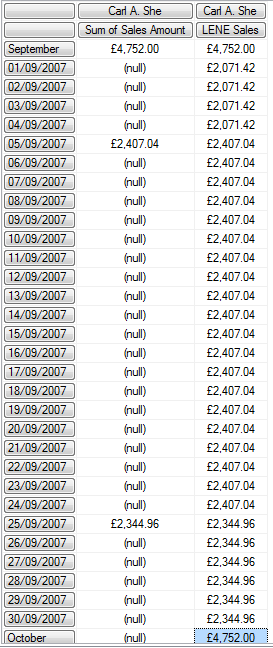
However, there's a problem here: this measure works at the Date level, but it doesn't return what you'd expect (or at least it isn't consistent with my original MDX solution) at the year level. What happens if someone buys on two different dates in the same year? This code will still return the value of [Sum of Sales Amount] for the last sales date, not the value of [Sum of Sales Amount] for the last year that had a value. For example, take customer Carl A. She:
SELECT
{HEAD([DimCustomer].[Customer].[Customer].MEMBERS, 3)
,[DimCustomer].[Customer].&[Carl A. She]}
*
{[Measures].[Sum of Sales Amount], [Measures].[LENE Sales Date]}
ON 0,
[DimDate].[CalendarYear].[CalendarYear].MEMBERS
ON 1
FROM [Model]

Carl made two purchases on different dates in 2007, but this calculation returns only the value of the last purchase.
To get around this, I had to use some conditional logic. At the year level, instead of returning the sales for the last ever date that had a sale, what I actually want is the sales for all dates from the last ever date that had a sale back to the beginning of the year that contains that last date:
LENE Sales Year:=
CALCULATE(
[Sum of Sales Amount]
, CALCULATETABLE(
DATESYTD(FactInternetSales[OrderDate])
, DATESBETWEEN(DimDate[FullDateAlternateKey], BLANK(), LASTDATE(DimDate[FullDateAlternateKey]))
, ALL(DimDate))
, ALL(DimDate)
)
Here, instead of using LastDate, I've used DatesYTD to get that table of dates. The same problem happens at Month level too, so DatesMTD must be used:
LENE Sales Month:=
CALCULATE(
[Sum of Sales Amount]
, CALCULATETABLE(
DATESMTD(FactInternetSales[OrderDate])
, DATESBETWEEN(DimDate[FullDateAlternateKey], BLANK(), LASTDATE(DimDate[FullDateAlternateKey]))
, ALL(DimDate))
, ALL(DimDate)
)
Finally, a measure that detects whether we're looking at a Year, Month or Date is necessary so the right value can be returned:
LENE Sales:=
IF(
HASONEVALUE(DimDate[FullDateAlternateKey])
, [LENE Sales Date]
, IF(HASONEVALUE(DimDate[EnglishMonthName])
, [LENE Sales Month]
, [LENE Sales Year])
)
Here's a query, using a hierarchy on DimDate that contains Year, Month and Date levels, to show the results:
SELECT
{[DimCustomer].[Customer].&[Carl A. She]}
*
{[Measures].[Sum of Sales Amount], [Measures].[LENE Sales]}
ON 0,
[DimDate].[Calendar].MEMBERS
ON 1
FROM [Model]
I can't help wondering whether there's a better way to solve this problem of getting the Year, Month and Date values correct. but that's a topic for a separate post I think.
 |
Chris has been working with Microsoft BI tools since he started using beta 3 of OLAP Services back in the late 90s. Since then he has worked with Analysis Services in a number of roles (including three years spent with Microsoft Consulting Services) and he is now an independent consultant specialising in complex MDX, Analysis Services cube design and Analysis Services query performance problems. His company website can be found at http://www.crossjoin.co.uk and his blog can be found at http://cwebbbi.wordpress.com/ . |